
The following methods can help you do that on your device. Enter your Apple ID password then tap Turn Off.
 Ios 11 1 Bug Activation Screen Unlock Clean Device Ios11 Remove Icloud Activation Screen Bypass Bypass Icloud Imei Clean Icloud Icloud Iphone Hacks Unlock
Tap on Delete Account and tap to disable Turn My iPhone.

How to turn off find my iphone 6 without icloud password. Here We Give You Instruction To Remove Find My iPhone Without Apple ID Password Without Previous Owner. Start Find iPhone Click the icon Find iPhone from the current iCloud apps after signing into the account. Find My iPhone allows a user to track there iPhone.
Close Find My iPhone Using iCloud. If you are not sure what version of iOS you are running a third-party unlocker tool like FoneGeek iPhone Passcode Unlocker can help. Tap your name Find My.
Choose The Device On the top of the page that follows choose All Devices and then the device on which Find My iPhone should be disabled. Unlock your iPhone then go to Settings iCloud and tap on your iCloud account. IOS 13 iPadOS 13 or later.
Now go to the iCloud and just scroll down a little bit until you find out the feature called find my iPhone on your iPhone 6 screen Now tap on find my iPhone and just click on it to disable it While disabling it you will be asked to enter your Apple ID and password so enter it carefully and click on turn off. Forgot your password. The main purpose of this guide is to remove the current iCloud and in turn disable Find my iPhone on the iPhone without entering a password.
Go to Settings your name Find My then turn off Find My device. Follow the steps to bypass Find My iPhone via a DNS server. A window will then prompt you to enter your iCloud password.
RESET YOUR iCLOUD PASSWORD. Besides you can use the recovery key to reset your password if you have it. If you dont know how to turn off Find My iPhone without a password relying on a credible and professional third party tool to turn off it is the most efficient way.
Delete the account by switching your iPhone turn on again. Turn Off Find My iPhone Using iCloud Activation Lock Removal for All iOS Versions Not being able to disable Find My iPhone without a password has bothered not just you but many Apple users. Using FoneGeek iPhone Passcode Unlocker.
Turn off Find My iPhone without Password iOS 9 and iOS 8 This workaround is very tricky and its not 100 working for all cases but still worth trying. Settings iCloud toggle off Find My iPhone. The security flaw in iOS 12 makes it extremely easy for iPhone owners to disable the Find My iPhone feature.
Alright the first step toward turning off find my iPhone without using your iPhone device is to use your computer for the task. You should then press and hold the power button and shut down your iCloud. This iPhone Unlock tool is an ideal solution to help you unlock your iPhone in various ways which includes turning off find my iPhone without.
You have to go to settings in your mobile and open iCloud Settings. Steps to Disable Find My iPhone Remotely from iCloudCom First Option. Then disable Find My iPhone.
IOS 12 or earlier. For the Find My iPhone app to work the user just have to set up an iCloud account to create the users Apple ID. Go to Settings your name iCloud then turn off Find My device.
Please read this whole article carefully for more details. But it may be a glitch or a loophole that makes it possible to disable Find My iPhone feature without the password. Now you can turn off Find My iPhone on your device with your new iCloud password.
IOS 12 does have a loophole that you can take advantage off. Enter your Apple ID password then tap Turn Off. Just go to iCloud Settings and tap on Delete Account.
Then enter your new Apple ID password and tap Turn Off. The current reliable and legal solution for Find My iPhone activation lock is to use FoneCope iBypasser bypass activation lock. After your password has been changed enter your new password to sign in.
After you reset your new password you can easily disable Find My iPhone according to this path. Turn Off Find My iPhone Without Password iOS 12 by Erasing the iCloud Account Description. Turn off Find My iPhone without Password by iPhone Passcode Genius.
Tap Find My iPhone then tap to turn it off Enter your Apple ID password. If you get a second-hand mobile phone without knowing the previous owner then this tool with a high success rate will be your good helper. On the Apple ID page tap Password Security Change password then enter your new password and tap Change.
Next a window will prompt and it will ask you to enter your iCloud password press and hold the Power button and shut down the iCloud. How to Turn Off Find My iPhone without Password For all iOS Versions. Remove iCloud Activation Lock with FoneCope.
Top 6 Ways to Turn Off Find My iPhone Without Password iOS 789101112 Way 1. The steps below will get you through. The second most important thing you should know before proceeding is your iDevice whether it is iPhone 6S 6 5S or 5 or it is iPod or you have got an iPad should be jailbroken.
Tap on delete account and tap Find My iPhone to disable it. Here how to turn off find my iPhone without password on iOS 7.
 Delete Icloud Account From Iphone Without Password Ios11 Delete Icloud Account Without Password Turn Off Find My Iphone Icloud Unlock Iphone Free Ipad Hacks
 Remove Icloud Lock Ios 12 4 Iphone Turn Off Find My Iphone Without Jailbreak Delete Icloud From Any Device For Permanently Fix Be Icloud Iphone Unlock Iphone
 How To Turn Off Find My Iphone Remotely And Bypass Activation Lock Iphone Iphone Apps Icloud
 How To Turn Off Find My Iphone Without Password On Ios 13 Turn Ons Turn Off Iphone Features
 Unlock Icloud Lock On Any Iphone By Icloud Unlocker Service Unlock Iphone Unlock Iphone Free Iphone
Find My Iphone Off Without Icloud Id Password Free Icloud Iphone Face Id
 Bypass Remove Icloud Activation Lock On Iphone Ipad Forever 2017 Free Icloud Unlock Service Bypass Activation Unlock Iphone Free Unlock Iphone Iphone Hacks
 Remove Icloud Activation Lock Clean Lost Erase Blacklist Full Success Icloud Iphone Life Hacks Unlock Iphone Free
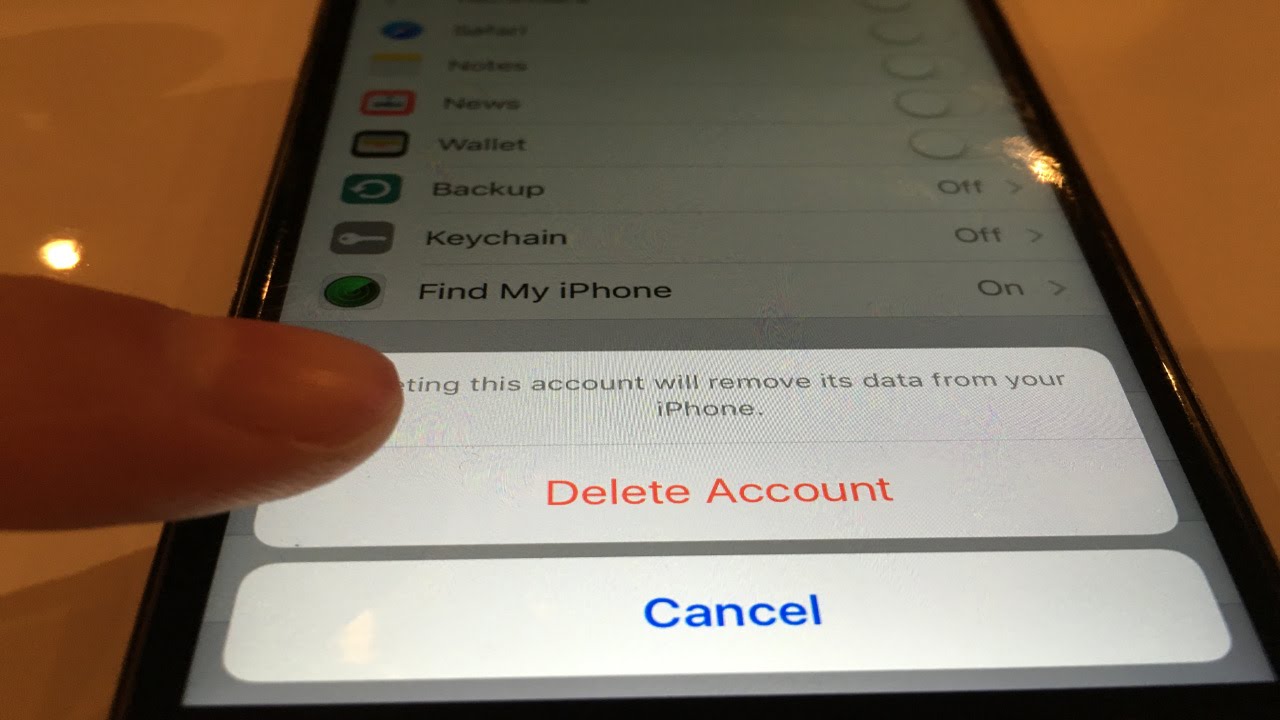 Delete Icloud Account Without Password Any Ios Version Iphone 7 6s Icloud Iphone Learn Hacking
 Icloud Activation Lock Removal Service Software Cracked Icloud Unlock Iphone Iphone
 Remove Icloud Activation Lock Clean Lost Erase Blacklist Permanent Full Success How Tofix Youtube Icloud Iphone Iphone Life Hacks
 How To Remove Icloud Activation Lock Without Password By Iprotocoltm Icloud Ipad Hacks Iphone Hacks
 Delete Icloud Account Iphone Without Password Ios11 Icloud Unlock Tools Icloud Unlock Iphone Unlock Iphone Free
 Free Turn Off Find My Iphone Permanently Iphone Ipad Locked Passcode Disabled Iphone Icloud Iphone Iphone 6s
 How To Turn Off Find My Iphone Click Here To Unlock Icloud Lock How To Disable Find My Iphone How To Turn Off Find My Iphone With In 2020 Unlock Iphone
 Permanent Fmi Off How To Remove Find My Iphone Without Password Icloud Delete Without Password Icloud Iphone How To Remove
 Icloud Activation Id Unlock Experts Activation Unlock Tool Free Online Unlock Iphone Unlock Iphone Free Unlock My Iphone
 Pin On Informations
 Turn Off Find My Iphone Account Without Password Remove Icloud Youtube Icloud Iphone How To Remove
 How To Delete Icloud Id And Remove Find My Iphone Without Password 2 Icloud How To Remove Iphone
 If You Don T Sign Out Of Icloud Before You Put Your Device In Recovery Mode And Restore Through Itunes It Might Unlock Iphone Free Unlock My Iphone Ipad Hacks
Https Encrypted Tbn0 Gstatic Com Images Q Tbn And9gctwrlsjheotipc6tsy1rjbawcc3avjv6xzjdwbtferm2kqnuowd Usqp Cau
 How To Remove Apple Id From Iphone Without Password Youtube Iphone Secrets Ipad Hacks Iphone
 How To Turn Off Find My Iphone Here S A Simple Guide On How To Disable Find My Iphone On Iphone X 8 8 Plus 7 7 Plus 6s 6s Plus Ipa Iphone Icloud Turn Off
